


Resolve issues remotely, including administrator prompts, restarts and the Windows sign-in screen.
1 platformRemote support · help desk · assets · renewals
2 clicksFor an employee to ask for help
0 portsEndpoints connect outwards only
~1 minuteSilent PC agent installation
A new language for support
Make getting help feel effortless.
Remote support should be as natural as asking a colleague. ProDesk Me turns a product name into a clear, useful action.
The old way“Can someone fix this?”
Search for a contact. Explain the problem. Wait for a response.
→
The ProDesk way“ProDesk me.”
One request opens the right support path immediately.
The business case
One tool instead of four.
ProDesk replaces separate remote-access licences, asset spreadsheets, ticket inboxes and renewal calendars with one connected system your engineers can work from.
Employees approve connections, see the engineer and live timer, and can stop the session at any time.
Manage multiple companies and departments with engineers and policies scoped to their machines.
Agents update themselves, repair their background service and report endpoint health automatically.
Move from a ticket to the machine, hardware and installed software without switching tools.
Pricing follows the number of managed systems, without per-engineer seats or servers to purchase.
Meet the desktop agent
Support starts right on the user’s screen.
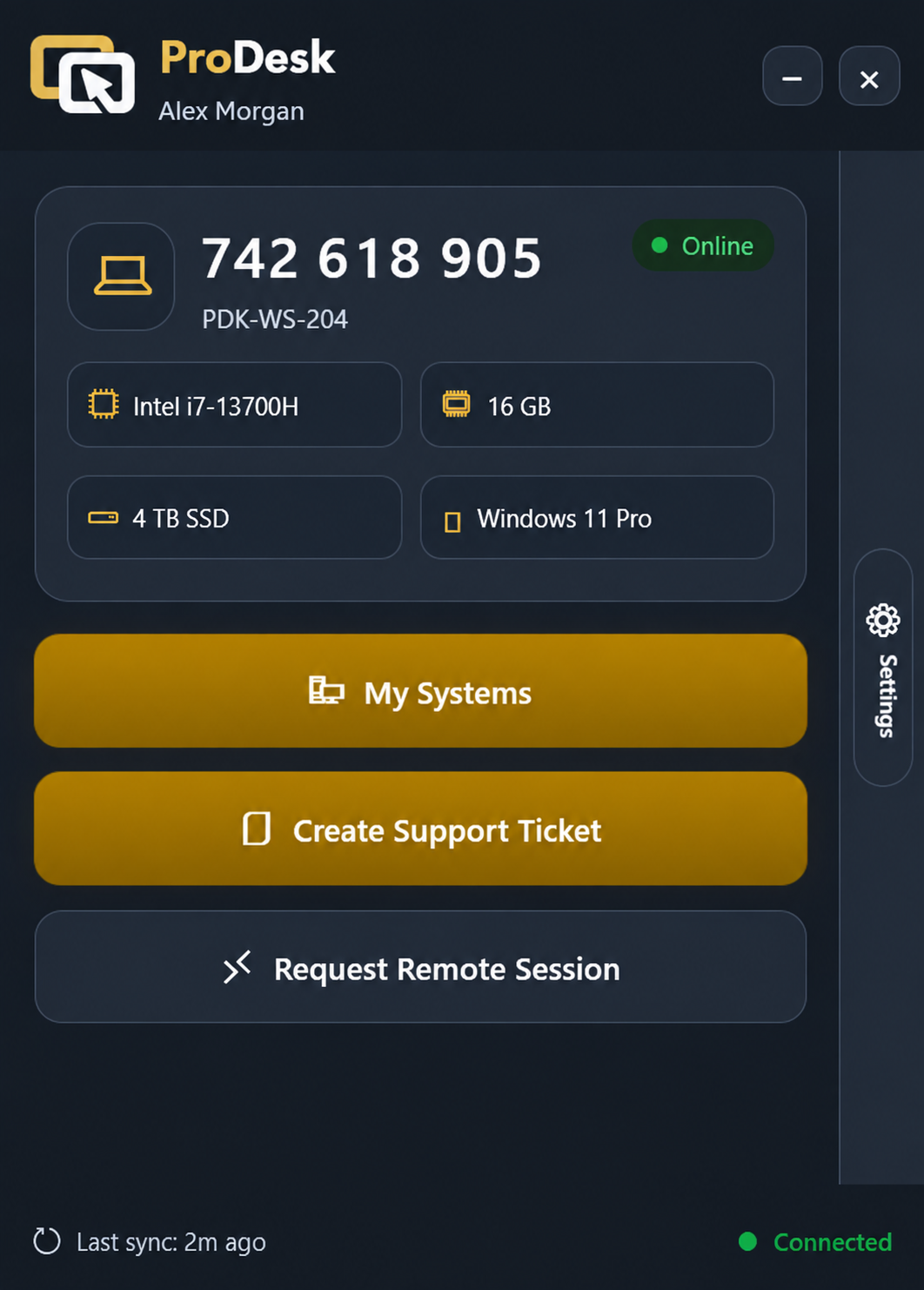
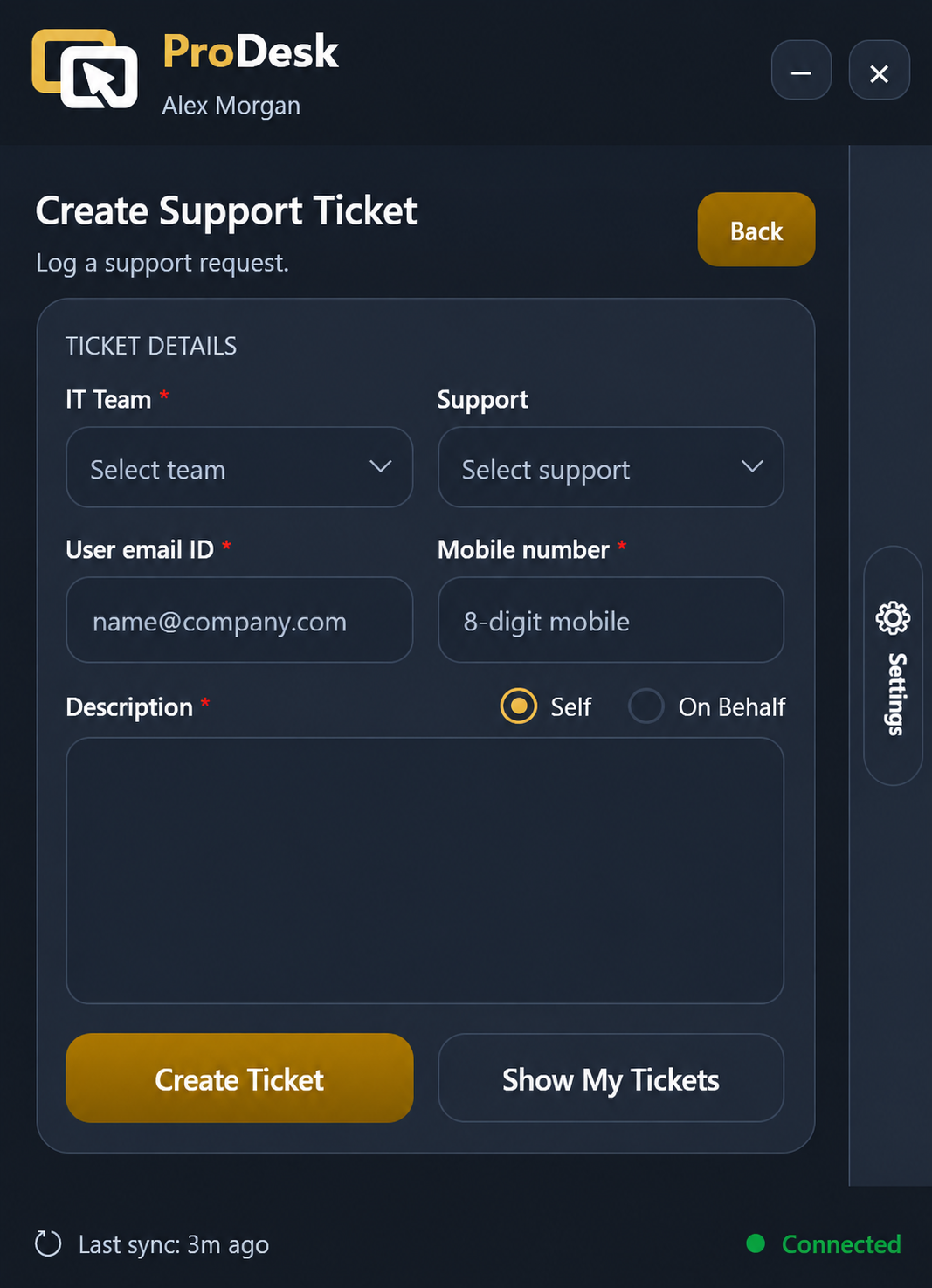
One lightweight workspace gives users their device status, ticketing, and live remote support—without searching for contacts or switching tools.
01
Device homeEverything a user needs in one place
02
Create a ticketStructured requests with the right context
03
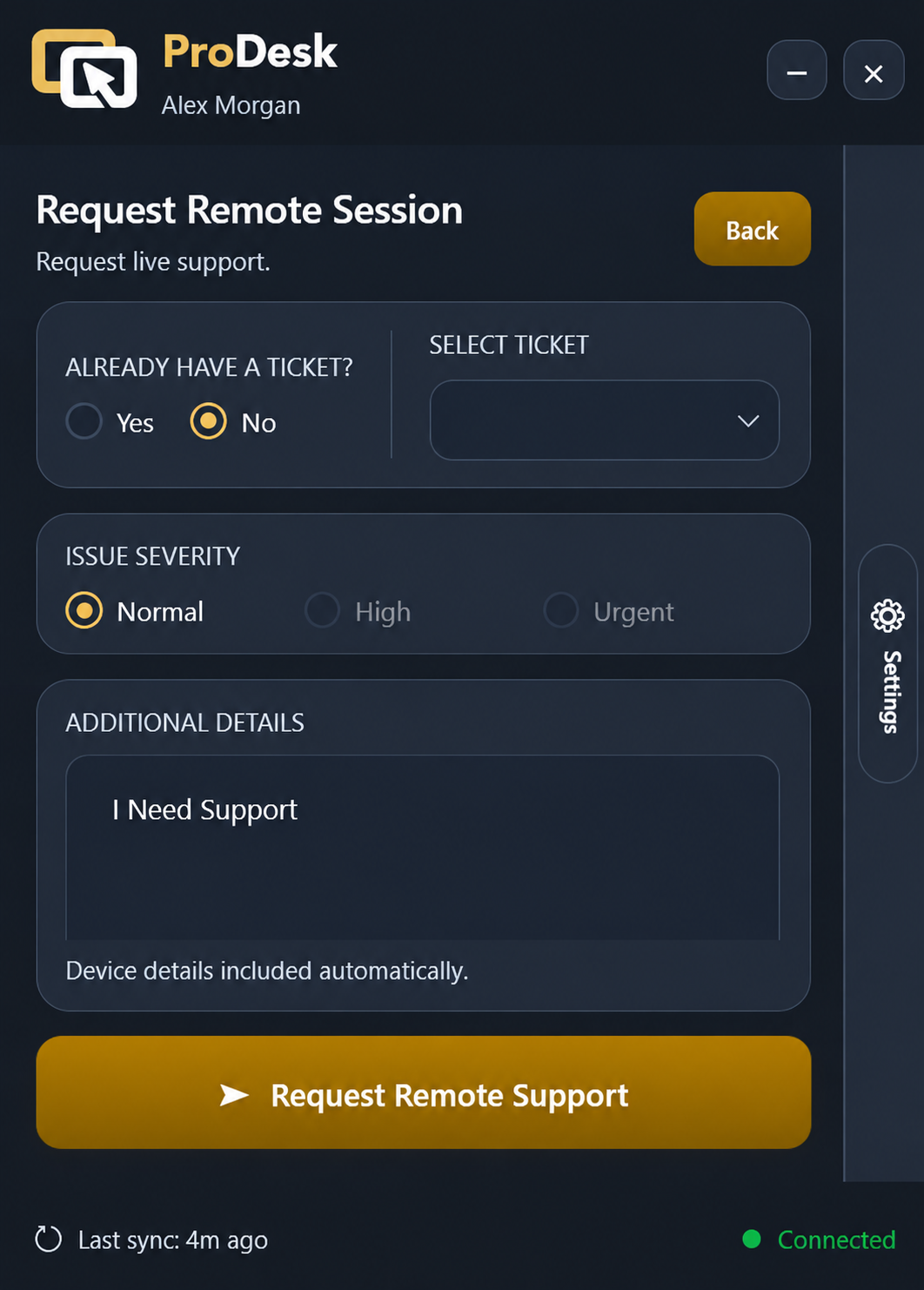
Request live supportPrioritised help in a few clear steps
✓
Designed around user consentRemote access begins only after the user submits and approves the request.
Eight connected modules
Everything in the platform.
Every module is included and works from the same live database, so information follows the engineer from request to resolution.
01Remote Support
- Connect by 9-digit ID or directly from the console.
- User consent, visible engineer identity, timer and Stop control.
- Multi-session tabs, multi-monitor view, file transfer, clipboard, screenshots and recording.
- UAC, Ctrl+Alt+Del, sign-in screen, restart and automatic reconnect.
- Adaptive image quality and employee input priority.
02Help Desk
- Two-click requests with Normal, High or Urgent severity.
- Live queue ownership prevents duplicate engineer responses.
- Configurable tickets, replies, notes, assignments and user comments.
- Offline ticket capture, automatic sync and desktop notifications.
03IT Asset Management
- Automatic hardware, operating-system and device inventory.
- Installed software, Windows updates and printers.
- Assignment by company, department and user.
- Live status, last sync, agent version and rename history.
04Renewals & Licences
- Track domains, subscriptions, licences, warranties and contracts.
- Seat assignment and release history.
- Vendor, term, auto-renew and renewal-history records.
- Colour-coded days to expiry before anything lapses.
05Application Vault
- Curated catalogue of approved applications.
- Silent-install settings stored with each package.
- Upload installers once and standardise versions across the team.
06Access Policies & Groups
- Scope engineer groups to the machines they support.
- Optional pre-approved access for named engineers.
- Policy password is verified on the endpoint itself.
- Active sessions are protected from silent takeover.
07Dashboard & Reporting
- Fleet presence, session volume and average duration.
- Tickets raised versus closed and engineer workload.
- Company reach and endpoint activity feed.
- Live updates without refreshing the page.
08Fleet Operations
- Multiple companies, departments, roles and module permissions.
- Silent whole-fleet agent updates and endpoint health alerts.
- Remote event history, logs and diagnostics.
- Full audit trail for sessions, tickets and administration.
Security and privacy by design
The PC decides. The console can only ask.
Session approval and access-policy verification happen on the endpoint. No server-side switch can silently bypass that decision.
See the employee experience01
End-to-end encryptionEach session negotiates fresh ECDH keys and encrypts traffic with AES-GCM between the viewer and endpoint. The relay only passes sealed traffic.
02
A fresh room for every sessionOne-time tickets and relay rooms prevent a declined or ended session from being rejoined.
03
Outbound-only endpointsManaged PCs open no inbound ports and require no firewall changes; they connect to the portal over HTTPS.
04
Visible, stoppable and auditedThe employee sees who is connected and can stop the session. Every connection and action enters the audit trail.
05
Hardened by defaultRate limits protect sensitive actions, device credentials use Windows DPAPI, and the relay address is pinned.
Support in three steps
From “help” to handled.
ProDesk Me removes the usual friction between a user reporting an issue and a technician resolving it.
01
Ask for helpOpen ProDesk Me and describe what is happening.
02
Connect with confidenceApprove the technician and stay in control of the session.
03
Get back to workYour issue, session history, and resolution stay together.
Your next support request
has three words.
Make remote support easier to ask for, easier to deliver, and easier to trust.
ProDesk me now ↓